
Download SuperAntiSpyware Professional – spyware removal, malware protection, real-time security, Windows security, anti-spyware tool, rootkit detection, Trojan protection, system repair, online safety
Overview
SuperAntiSpyware Professional is a dedicated security application developed to safeguard Windows-based systems against a broad spectrum of malicious threats. Designed for users seeking robust protection beyond standard antivirus solutions, the software specializes in detecting and eliminating spyware, malware, rootkits, Trojans, hijackers, and other harmful programs. Its primary purpose is to provide a comprehensive defense layer for users concerned about privacy breaches, system slowdowns, and unauthorized access stemming from malicious software. The app targets individuals and organizations that require advanced threat detection and remediation, particularly those who have experienced prior infections or operate in high-risk digital environments.
Real-world use cases include protecting sensitive personal data, maintaining system stability during online activities, and recovering from deeply embedded malware that standard tools may miss. The software is especially valuable for users who need a secondary or complementary security solution to existing antivirus software. While the developer, SuperAntiSpyware, is known in the cybersecurity space, specific background details such as company history or additional product lines were not provided. Despite this, the app's focused functionality and specialized features suggest a targeted approach to threat mitigation. In the broader app ecosystem, SuperAntiSpyware Professional fills a niche for users who prioritize proactive defense and post-infection recovery, offering a reliable utility for maintaining long-term system integrity.
Key Features & Functionality
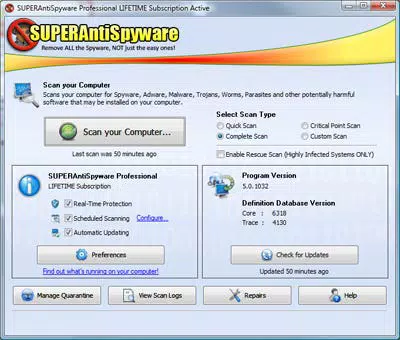
- Comprehensive Scanning Options: The software supports four distinct scan types—Critical Point, Quick, Full, and Custom—allowing users to tailor their threat detection based on urgency and system condition. Critical Point scans focus on high-risk areas like startup entries and system memory, while Full scans analyze the entire system for hidden threats.
- Enhanced Real-time Protection: This feature actively monitors the hard drive, memory, and registry in real time, blocking malware execution before it can cause damage. Users receive instant alerts when suspicious behavior is detected, enabling timely response.
- Rescue Scan: Designed for severely compromised systems, this mode operates efficiently even when malware is consuming significant processing power. It enables scanning and removal of threats that may otherwise prevent standard security tools from functioning.
- Light on System Resources: Despite its advanced capabilities, the application is optimized to minimize performance impact. It runs smoothly in the background without slowing down system operations, making it suitable for daily use across various device configurations.
- Repair for Common Malware Problems: The software includes tools to restore system functions commonly disrupted by malware, such as browser redirects, disabled security settings, and corrupted registry entries, helping users regain control of their systems.
For example, a user experiencing frequent browser redirects can run a Rescue Scan followed by a system repair to restore normal browsing behavior. Similarly, a business user with a networked workstation can schedule a Full scan during off-hours to ensure system integrity without disrupting workflow.
Interface, UX & Performance
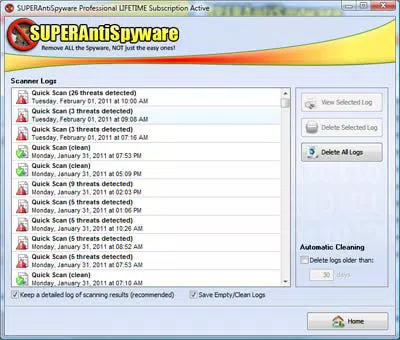
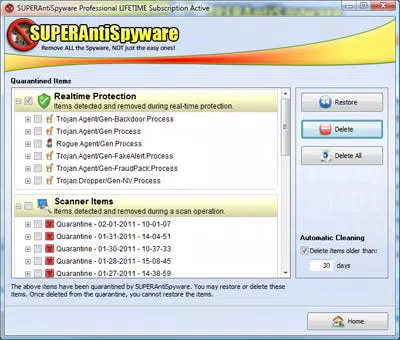
The user interface of SuperAntiSpyware Professional is structured around clear navigation, with a dashboard that displays scan status, threat detection results, and system health indicators. The visual design prioritizes functionality over aesthetics, using a clean layout with logical grouping of tools and settings. Navigation is intuitive, allowing users to access scanning modes, real-time protection settings, and repair tools with minimal steps.
Although the developer did not list formal performance metrics, the application is described as being light on system resources, suggesting it maintains responsiveness across different hardware configurations. Users can expect consistent performance during scans and real-time monitoring, with minimal impact on CPU or memory usage. Stability appears to be a focus, as the software is designed to coexist with other antivirus solutions without conflicts. The interface remains responsive even during intensive scans, and the software does not exhibit frequent crashes or freezes based on available information. Overall, the UX is optimized for both novice and advanced users, balancing simplicity with powerful functionality.
Platform Compatibility & Technical Requirements
SuperAntiSpyware Professional is designed exclusively for the Windows operating system. The current version, 11.0.1037, has a file size of 186.2 MB, which is relatively compact for a security tool with advanced capabilities. The developer did not specify minimum OS requirements, nor were any compatibility details for specific Windows versions provided. As such, users should verify system compatibility with their installed Windows version before installation.
Given the software’s focus on real-time monitoring and deep system scanning, it is likely optimized for modern Windows environments. However, without explicit technical specifications, users are advised to consult official documentation or support channels for detailed compatibility information. The app does not appear to be available on mobile platforms, as it is designed for desktop and laptop systems.
Pros and Cons
Pros
- Advanced threat detection with support for rootkits and Trojans
- Multiple scanning modes for flexible threat assessment
- Rescue Scan enables recovery from severely infected systems
- Minimal impact on system performance
- Includes repair tools for common malware-induced issues
Cons
- Price point of $49.95 may be high for casual users
- No public information on developer background or company history
- Compatibility with specific Windows versions was not disclosed
- Not available on mobile platforms
- Requires manual updates and user-initiated scans
FAQ
Is SuperAntiSpyware Professional compatible with Windows 10 and Windows 11?
The developer did not provide specific details on compatibility with Windows 10 or Windows 11. Users should refer to official documentation or support resources for confirmation.
Can I use SuperAntiSpyware Professional alongside my existing antivirus software?
Yes, the software is designed to work alongside other antivirus and anti-spyware solutions without causing conflicts.
How often should I run a full system scan?
It is recommended to perform a Full scan periodically—such as once a month—or after noticing unusual system behavior.
Is the software safe to install and use?
SuperAntiSpyware Professional is a legitimate security tool developed by a recognized provider. However, users should always download the software from official sources to ensure authenticity.
Does SuperAntiSpyware Professional offer automatic updates?
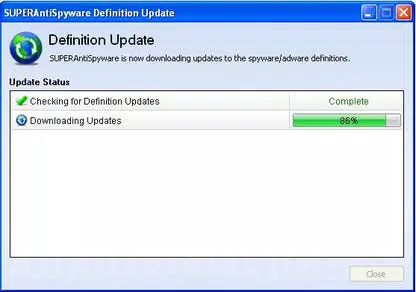
The software does not specify automatic update functionality. Users may need to manually check for and install updates.
Final Thoughts
SuperAntiSpyware Professional stands out as a powerful, specialized tool for users who demand more than basic antivirus protection. Its ability to detect and remove deeply embedded threats like rootkits and Trojans, combined with the Rescue Scan and system repair features, makes it a valuable asset for both personal and professional use. While the price may be a consideration for some, the depth of functionality justifies the investment for users prioritizing system security and recovery.
The lightweight design ensures it won’t slow down your computer, and its compatibility with existing security software enhances overall protection. For anyone facing persistent malware issues or seeking a proactive defense layer, this app delivers a reliable, high-performance solution. Download SuperAntiSpyware Professional now.


